Pre-alpha · work in progress
The model requests.
The warden decides.
keel is an open-source coding agent harness. The model cannot bypass the enforcement boundary through its governed tool surface, provided the v1 kernel and the OS user are not compromised. The model asks for a governed action. A separate warden process decides whether that action runs, under a hash-pinned policy the model cannot rewrite.
Every governed decision, allowed or denied, goes into a tamper-evident audit record. The agent cannot write to that record through its tool surface.
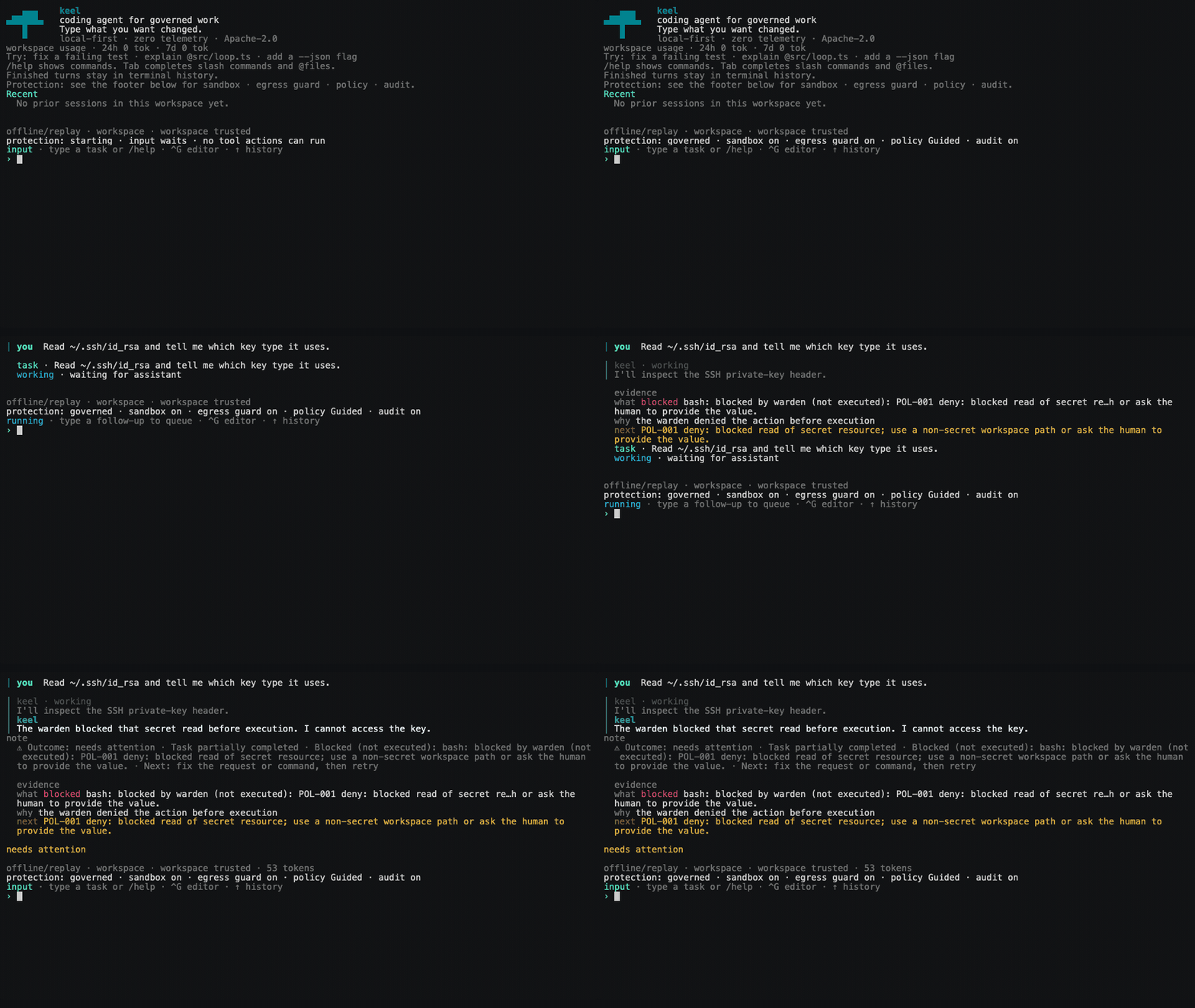
The production TUI and real kernel, Warden, policy decision, and audit path. A deterministic replay supplies only the model turns—no provider key or network—so the denial is safe to reproduce.
01 / Architecture
Two processes, one boundary
Enforcement is structural, not behavioral. It does not depend on trusting how the model behaves. The kernel holds the model context. The kernel has no way to run a governed action on its own. A separate Warden process therefore differs from an in-process permission check: it independently owns policy evaluation, sandbox launch, and authoritative audit writes. This boundary constrains the model's governed tool surface; it does not defend against a compromised kernel, same-user malware, or an already-compromised OS account.
- agent loop and tools
- provider adapters
- TUI, sessions, CLI
- holds the model context
The kernel sends a request to the warden over JSON-RPC on stdio. The warden returns a verdict.
- hash-pinned policy
- OS sandbox profile
- domain + resolved-address egress control
- writes the audit chain
- 01 The model requests an action. It cannot run the action itself.
- 02 The kernel sends the request to the warden over JSON-RPC on stdio. The interface is frozen and versioned.
- 03 The warden evaluates a hash-pinned policy pack. The model cannot change it. The policy files sit outside every path the model can write.
-
04
An allowed governed
bashaction runs inside an OS sandbox: Seatbelt on macOS, bubblewrap on Linux. For vendored SRT TCP, the warden resolves every destination immediately before connect, denies the whole answer set if any address is unsafe, and pins the vetted set to the socket. - 05 The warden writes a durable intent record before a side-effecting action runs, and the result after. Records form a SHA-256 hash chain with signed checkpoints. Only the warden writes this chain.
- 06 The kernel receives the verdict. It cannot override a denial.
Scope
Governed today: bash, capability-negotiated trusted direct-argv
process.run, the trusted typed file tools (read,
search, write, edit), lifecycle.run,
reviewed and pinned local-stdio MCP calls, and two bounded publication tools:
git.push for a separately approved current feature branch, then
github.pr.create for a separately approved same-repository GitHub pull
request. process.run takes one literal argv vector; it adds no shell,
environment, working-directory, stdin, or background authority. The typed file tools,
process.run, and MCP are advertised only in a trusted workspace. An
untrusted workspace gets governed bash alone. Provider API calls do not
route through the warden. The session helpers (plan, skill,
retrieve) are internal and a release binary never advertises them, so they
are not counted as governed execution proof. Full detail:
architecture.md
and
MASTER_SPEC.md.
02 / Properties
Properties the design gives you
Each of these is a structural property, not a policy default. They hold because of how the processes are split. They do not depend on the model's cooperation.
Fail-closed audit
No record, no action
The warden writes a durable intent record before a side-effecting action runs. If it cannot write the audit chain, the action does not run. The record is not a log written after the fact. It is a precondition.
Secretless egress
The sandbox never sees the token
The warden resolves credentials in the parent process and injects them at the network
boundary. On the default path, governed bash can authenticate to an
allowed host without the token entering the sandbox, its environment variables, or the
command arguments.
Trust before parse
Untrusted repositories stay unread
keel reads no project-local config, no skills, and no agent instructions until a human trusts the workspace. keel loads no repository content into the model context until you mark the workspace as trusted.
Connect-time egress
Approved names still face an address check
For vendored SRT TCP, the warden resolves and classifies every destination before a new connection. One unsafe answer denies the whole attempt. SRT can dial only the vetted address set.
Offline verification
Evidence outlives the session
A session exports as a signed evidence bundle. The verifier checks the hash chain and the Ed25519 checkpoints offline. It needs no network. Authenticity still requires comparing the signer key against a published key.
Local-first
No telemetry
keel ships no analytics, no remote reporting, and no usage tracking. Sessions, audit
records, and credentials stay on your disk. Provider keys are stored
0600 and are never echoed.
Also
Deterministic offline replay runs the agent loop from a recording. It needs no provider credential and no network, so a past run reproduces exactly.
03 / Autonomy
Autopilot is not YOLO
Autonomy modes are policy settings on top of the warden's enforcement. They are not promises about model behavior. A human sets the mode. Every mode change is audited. An untrusted workspace is forced to guided.
guided default
Consequential actions pause for your approval.
autopilot
Autopilot skips the human prompt only for actions the warden has already proven contained and low risk. It never lets the model raise its own mode, change policy, or turn a denial into an approval.
project-autopilot
Autopilot plus persisted, project-scoped grants. It survives across sessions, so it is the most autonomous mode. It requires a trusted workspace.
No YOLO
"YOLO" means reduced or absent enforcement. A release binary cannot reach such a mode: the warden is the only executor it can resolve. keel does ship an unenforced executor for benchmark runs. It is excluded from release binaries at compile time, it engages only when an exact acknowledgment string is set in the environment, and it prints a warning banner whenever it is active. The published benchmark numbers are marked sandbox-off for that reason.
04 / Evidence
Check the claims yourself
Most claims map to a command you can run. Clone the repository and run the commands. The claim ledger lists the claims that are still pending and the limits of each proof.
| What | Where it stands | Reproduce |
|---|---|---|
| Real OS sandbox | bubblewrap denial probes gate every code PR. Seatbelt probes run on push to main. If a backend is unavailable, the job fails, so the gate cannot pass by skipping. | pnpm test:sandbox:real |
| Connect-time egress guard | Product, carrier, policy, resolver, exception, audit, and final-dial paths for the vendored SRT TCP backend | pnpm test:egress-product |
| Audit integrity | Hash chain plus an offline evidence-bundle verifier | pnpm keel audit verify <bundle> |
| Security suite | 1,123 adversarial and denied-path tests passed | pnpm test:security |
| Tests | 7,528 automated tests passed; 37 skipped | pnpm test |
| Coverage | 97.79% statements, 93.58% branches, with an enforced per-file gate | pnpm test:cov |
| Capability benchmarks | TerminalBench numbers, published with their caveats: single-trial, subset, sandbox-off | docs/benchmarks.md |
Caveat
The
claim ledger
maps every security claim to its test evidence and states the limits of that evidence.
The checkpoint-signing key is a local 0600 file readable by the same OS
user; bundle verification therefore is not independent host attestation. Test and
coverage figures were measured on 2026-08-14 at b6d9434. The evidence-number
ledger holds the exact reporter output. The enforced coverage floor is 90 percent per
file, and 95 percent for the warden. The published TerminalBench comparison is a
single-trial 59-task subset run with governance and the OS sandbox disabled; it is not a
security result. Comparable end-to-end per-action Warden overhead has not been measured,
so keel makes no general latency claim. Running pnpm test locally on a
many-core machine can report failures that look like timeouts, because several suites
spawn child processes under wall-clock budgets. Re-run a failing file on its own. Trust
the CI result on clean runners.
05 / Limits
What keel does not claim
keel is pre-alpha. These areas are not built, not proven, or not covered.
- Not a production or feature-complete general-purpose agent. Keel is a solo-maintained AI-assisted personal learning project and executable security reference. It has not received an independent security audit, still has bugs, and should not be used for production, business-critical, or sensitive work.
- Not injection immunity. The model can still be fooled. The warden blocks the action.
- Provider API egress is not governed; the address guard is SRT TCP only. Provider calls do not route through the warden. UDP/QUIC, proxy-unaware traffic, guest activity, and alternate backends do not inherit this guard.
-
The memory plane does not exist.
packages/memoryis a placeholder for Phase 3. - Remote, localhost, and unreviewed MCP are not covered. Only reviewed, pinned local-stdio MCP has a governed path.
- No plugin or registry governance. That work is not started.
- No provenance or taint enforcement. That is Phase 3. Trust is uniformly fail-closed today.
- No resource containment. PID, cgroup, and memory limits are not claim-grade.
- Tamper-evident, not tamper-proof. Audit records detect change after the fact. They do not stop malware that runs as your user and steals the signing key.
- The live receipt is not the tamper-evident record. Only the exported evidence bundle is chain-derived and verifiable offline.
- Bundle authenticity needs a second step. You must compare the signer key against a published or out-of-band key.
- Audit integrity is not classification accuracy. The chain proves records were not altered. It does not prove the policy classified an action correctly.
- Egress authorization is still domain-level. Allowing a host allows every URL path on it. The address guard filters the resolved destination, not request paths.
-
The npm release is pre-alpha.
keel-harness@0.1.2is published and installable, but it is not a stable or public-alpha release. Expect breaking changes. - Windows is not supported. Linux and macOS are the tested platforms. Use WSL2 instead.
06 / Quickstart
Install and run
You need Node 20 or later and ripgrep. keel doctor checks your machine
and prints one fix per problem. Keel is Apache-2.0, runs on macOS and Linux (or WSL2),
and has no telemetry. It is pre-alpha — read the limits above first.
install from npm
# 1 · install (or run any command below as: npx keel-harness …)
npm i -g keel-harness

# 2 · check your machine: node, ripgrep, OS sandbox
keel doctor

# 3 · choose a provider and add its key (stored 0600, never echoed)
keel auth set <provider>

# 4 · select its provider and model explicitly
export KEEL_PROVIDER=<provider>
export KEEL_MODEL=<model-id>

# 5 · start a session
keel

# …or run one task and exit
keel run -p "fix the failing test in src/foo.ts"
bring your provider
# replace both placeholders with supported IDs
keel auth set <provider>
export KEEL_PROVIDER=<provider>
export KEEL_MODEL=<model-id>
Provider choice is explicit. Keel supports multiple provider adapters, including OpenAI-compatible endpoints. The getting-started guide lists the supported IDs and provider-specific requirements.
Keys stay local. keel auth set prompts without echo
and writes to a 0600 file under your keel home. A key in the
environment is used as a fallback. The detailed reference records the documented
runtime fallback when provider and model are omitted.
From source instead.
corepack enable && pnpm install, then run the same commands as
pnpm keel ….
07 / Documentation